Key Stage 2 · Ages 7–11 · UK curriculumSeven worlds.A galaxy of missions.One very determined robot.
Pixelverse Academy turns maths, English, science, geography, history, computing and wellbeing into a retro space adventure. Children think they're flying missions. They're actually revising.
Free to use, right in your browser.
No app store, no account needed.
↓ PICK A PLANET TO SEE WHAT'S ON IT
NUMERIA — MATHS PLANET
New missions are added to every planet as the academy grows.
See it in action
This is what your child will see.
Real screens from the app as it is today, on a phone. The child here, Sam, is made up for the pictures.
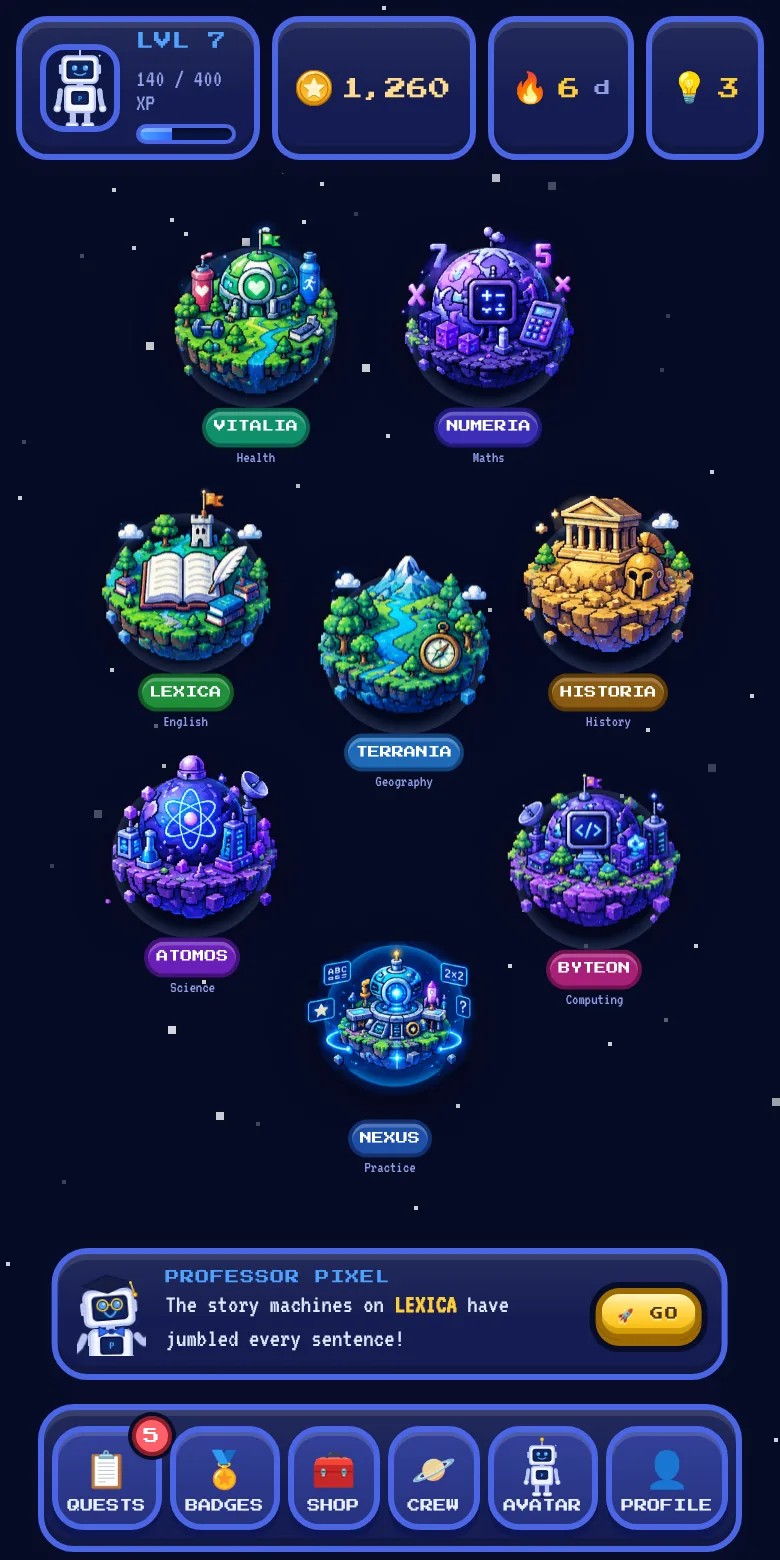
The galaxy map
Seven worlds to explore. Professor Pixel suggests where to go next, usually where a little practice will help most.
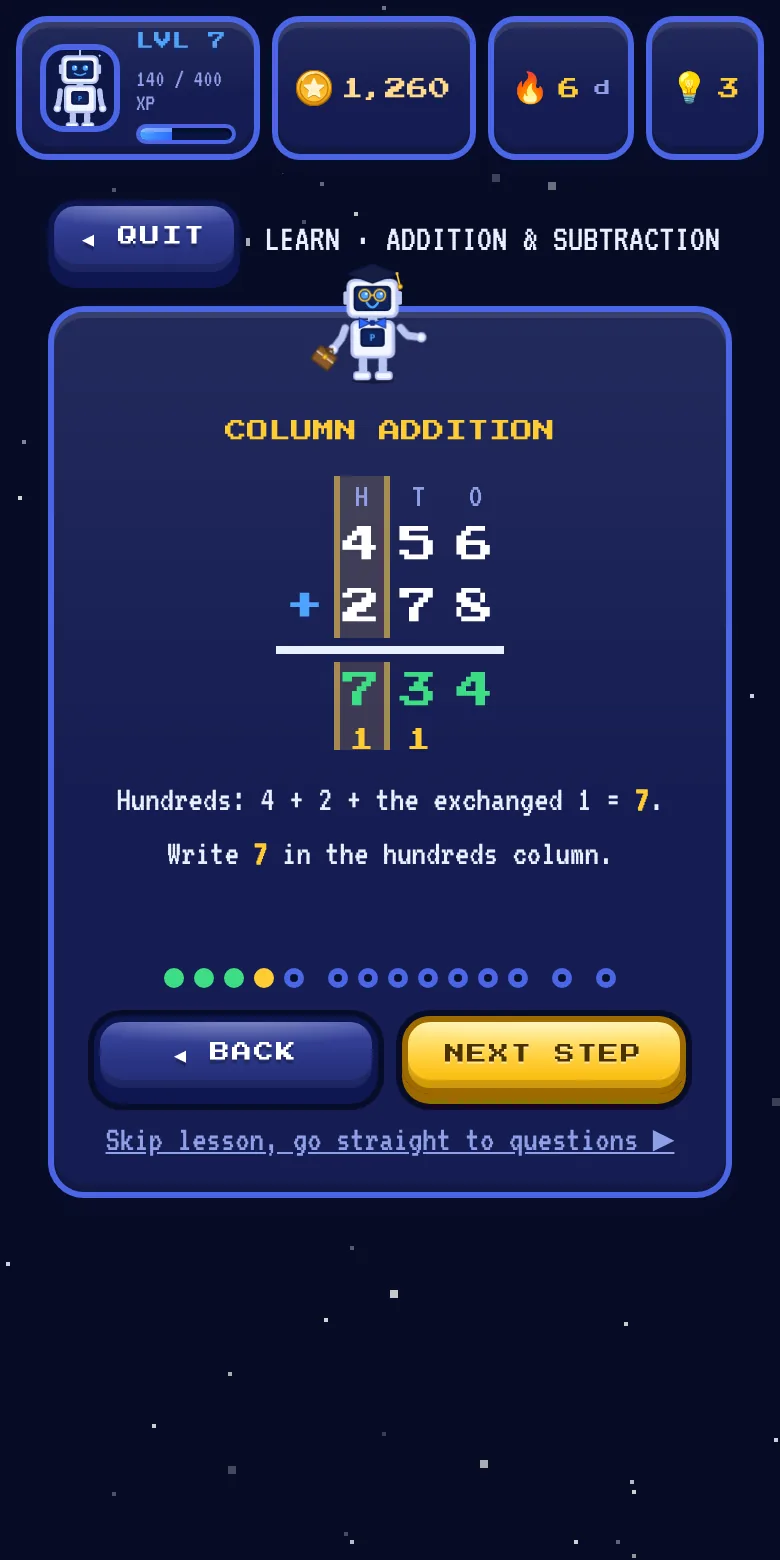
Lessons that show the working
Before the questions, a short lesson. Here it works 456 + 278 one column at a time, a tap per step.
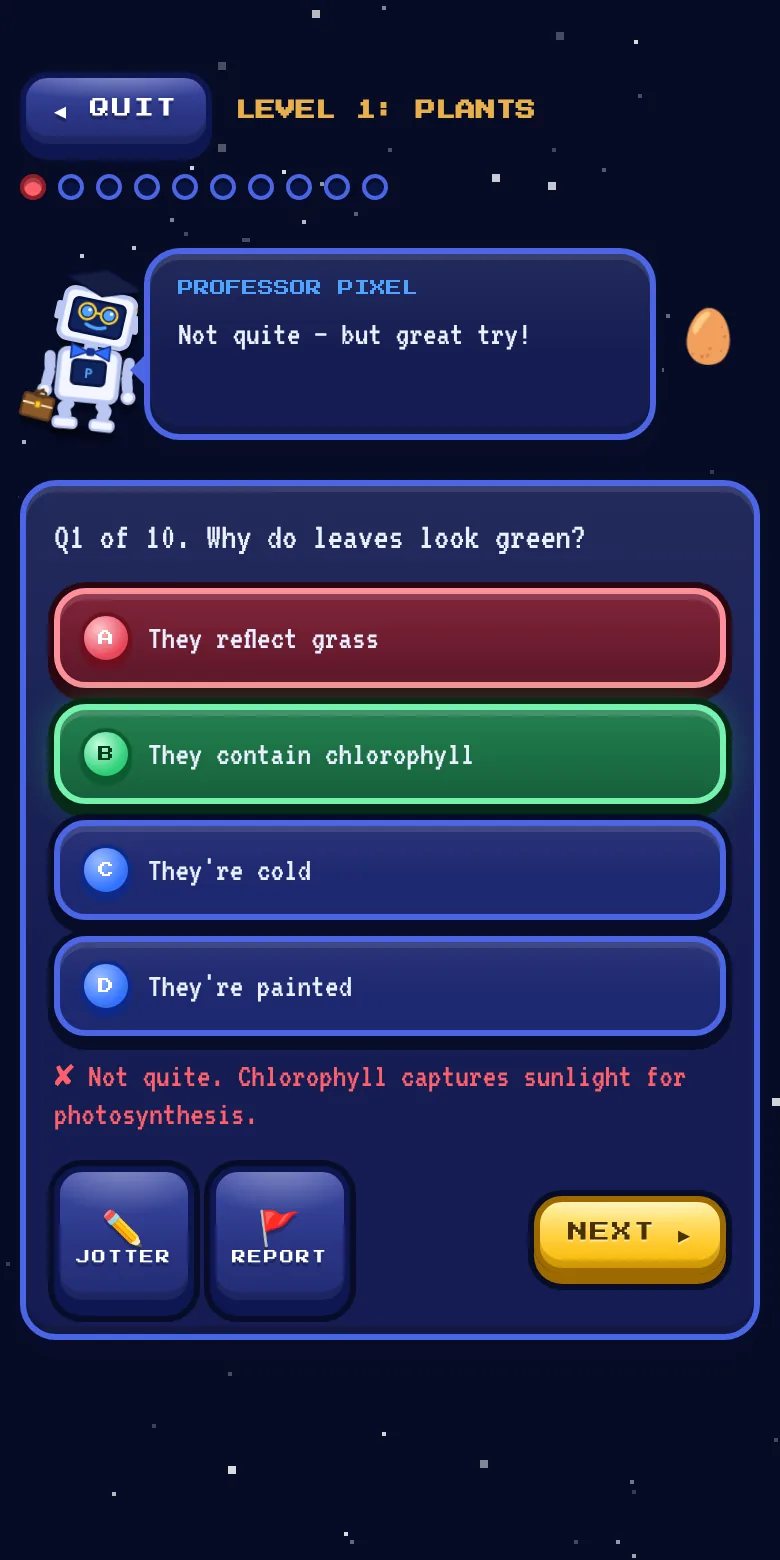
Every answer explained
Get one wrong and Professor Pixel says why, kindly, and shows the right answer. Missed questions come back later for another go.
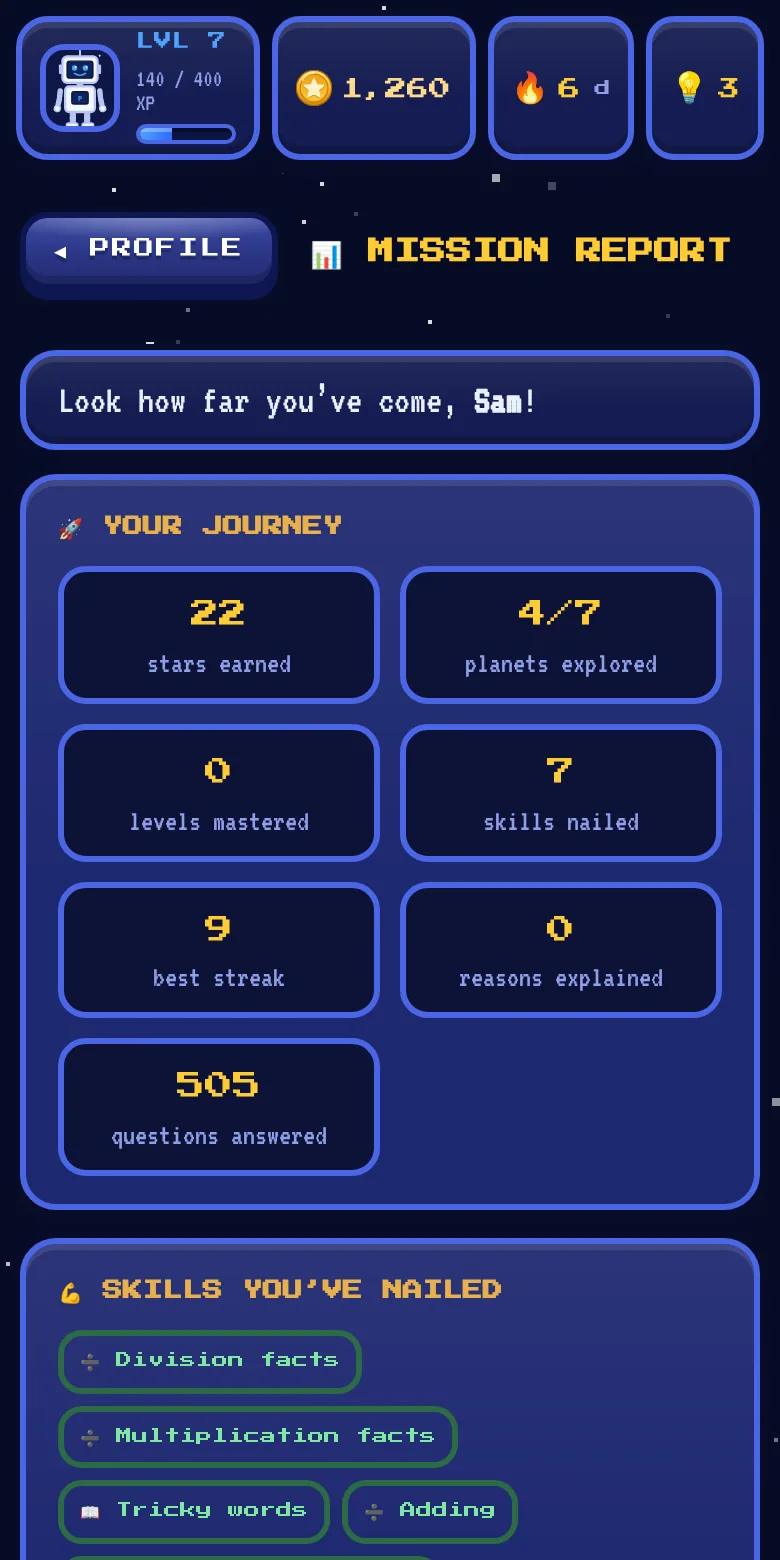
Progress, not percentages
Children see the skills they've nailed and where to head next. The detailed scores are in the Parent Zone, which a parent code can lock.
← swipe for more →
How a mission works
Learn first. Then fly the mission.
Every mission teaches before it tests, so children meet an idea properly before they're asked about it. A session fits the gap before dinner rather than swallowing an evening.
Pick a planet
Professor Pixel suggests where to go next — usually the subject that needs the most work, sometimes just somewhere new.
Read the lesson
A short explainer card sets up the idea first, so the questions build on something taught rather than testing cold.
Fly the mission
Twenty questions — multiple choice, matching, ordering and fill-the-gap — each with an explanation, not just a tick or a cross. Pass and the next unlocks; missed questions go to the Repair Bay to try again later.
Who it's for
Built for the two people who have to trust it.
See what's landing
and what isn't
- Mission ReportPlain-English strengths and gaps — which topics were nailed first try, and which needed hints.
- A profile of their ownThe free version has one explorer per device, with their own saved progress, avatar and planets. With Pixelverse Plus, a family can have up to four explorers on one device.
- Optional cloud backupSwitch it on and progress follows your child from the tablet to the family laptop. Leave it off and everything stays on the device.
- No ads, no chat, no strangersThere's nothing in the app for anyone to sell to your child, and no way for them to talk to anyone.
- Add it to the home screenInstalls like an app and works offline — no app store, no download, on phone, tablet or the family computer. Here's how.
Mapped to
Key Stage 2
- Seven subjects, aligned to the curriculumMaths, English, science, geography, history, computing and health & wellbeing — the last built to the September 2026 statutory guidance.
- Teaches, then testsEvery mission opens with a lesson and explains every answer, so it's revision that actually reinforces rather than just scoring.
- Built for every readerQuestions can be read aloud, with adjustable text size and an easy-read font — shaped by a pilot family whose child has additional needs.
- Works on school devicesRuns in a browser, installs to the home screen, no app-store approval and no logins to administer.
- Teacher Zone: coming soonWe're building tools for teachers: interactive lessons for the whole class, set work and class targets, and each child's progress, with their family's permission. Register your interest and we'll tell you when it's ready.
- We want your notesWe're looking for primary schools to trial it and tell us where the content needs work.
On a phone or tablet
Add Pixelverse to your Home Screen.
No app store needed. A few taps puts it on your Home Screen with its own icon, so your child can open it like any other app.
In Safari
- Open the app in Safari: pixelverse-academy.netlify.app
- Tap More (•••) next to the address bar, then Share. If you can already see the Share button, tap that instead.
- Scroll down and tap Add to Home Screen.
- Leave Open as Web App switched on, then tap Add.
In Chrome
- Open the app in Chrome: pixelverse-academy.netlify.app
- Tap the menu (⋮) at the top right, next to the address bar.
- Tap Install and create shortcut, then Install. On older versions of Chrome it says Add to Home screen or Install app.
- Follow the steps on screen. The Pixelverse icon appears on your Home screen.
Tip for iPhone and iPad: the Home Screen app keeps its own progress, separate from Safari. Add it before your child starts, and use it from the Home Screen from then on. Cloud backup, set up by a grown-up in the Parent Zone, can bring progress across.
OPEN THE APPBeyond the planets
There's more than missions.
Between the planets sits the Nexus — home base, where Professor Pixel waits and the extra practice lives.
Spelling Bee
Hears a word from the statutory KS2 lists and spells it back — proper spelling practice, out loud.
Times Tables
Adaptive drills that lean into the facts they keep missing, not the ones they already know.
Repair Bay & Pop Quiz
Missed questions return for a second go, and a mixed-subject Pop Quiz is there any time for a quick blast.
Collect & customise
Coins earned by learning kit out an avatar, hatch companions and upgrade ships — earned only, never bought.
Pixelverse Plus
More for families. The game stays free.
Plus is a subscription for parents and carers, with more insight into how your child is getting on. One price covers up to four children. Subscribe in the app, from the Parent Zone.
FOUNDING FAMILIES: 25% OFFThe first 100 families to subscribe pay 25% less for as long as they stay subscribed: £3.74 a month or £29.99 a year. While places last: the app shows how many are left.
£4.99a month
Billed every month
£39.99a year
Works out at £3.33 a month
- A weekly progress report by email
- More detailed insights into your child's progress
- Certificates when your child masters a region or a planet
- A focus you choose for your child's missions
- Step-by-step working in hints
- A monthly top-up of streak freezes
- More explorer profiles on one device
Plus keeps Pixelverse growing. Your subscription pays for ongoing improvements and development, and your feedback helps steer where the app goes next.
Prices are in pounds and include VAT. Plus is sold through Paddle.com, our online reseller and Merchant of Record, which takes the payment and handles billing, receipts and refunds. See our terms, refund policy and privacy notice. Only a grown-up can subscribe: children never see an offer for Plus in the app, and everything in the game is earned by learning, never bought.
To subscribe, open the app, go to Settings, then the Parent Zone (it asks for your parent code), and tap PIXELVERSE PLUS. Plus belongs to your family's free cloud backup account, which you can set up there too.
OPEN THE APPThe flight plan
Where we are, and where we're going.
We'd rather show you the honest state of things than pretend it's finished. Here's the route from here.
Family testing
A small group of parents and children used the app first and told us what worked, what was confusing and what was too easy or too hard.
Open to everyone
The app is free to use now, in any browser, with no account needed. We keep adding missions across all seven worlds and acting on what families tell us.
Pixelverse Plus
Extras for families: a weekly progress report by email, more detailed insights into your child's progress, certificates when your child masters a region or a planet, a focus you choose for your child's missions, step-by-step working in hints, a monthly top-up of streak freezes, and more explorer profiles on one device. See Plus and the founding price. Native iOS and Android apps follow.
Into the classroom
Pilots with primary schools, and the teacher-side tools that come with them: class groups, set homework, and progress across a whole year group.
We're not putting dates on these yet. Leave your email and we'll tell you when each one lands.
Who's behind it
A small team, with a KS2 teacher in it.
Pixelverse Academy is an extra resource that sits alongside what children learn at school: something they can pick up at home to practise what they've covered in class, and, as it grows, a way for teachers to follow how each child is getting on, subject by subject.
It's built with the guidance of a current primary school teacher, who has shaped the questions so each one means something and moves learning on, rather than being question and answer for its own sake.
Families in our pilot used it first, and what they told us changed it. Read-aloud questions, bigger text and an easy-read font all came from a parent whose child has additional needs. Now it's open to everyone, and the feedback button in the app comes straight to us.
News & teacher interest
Hear it first when something new lands.
There's no list to join before you play: the app is free to explore now. Leave an email if you'd like to hear when something new arrives, like new missions or the iOS and Android apps. Teachers: the Teacher Zone is coming soon. Tell us your school and we'll let you know when it's ready.
YOU'RE ON THE LIST
We've got your details — there's no confirmation email to look out for. When there's news we'll write to you from info@pixelverse-academy.com, so it's worth adding that to your contacts now so it doesn't land in spam.